Launch in 3 days

Webflow sites for founders who need leads

Built in Webflow. Designed for conversion. Three of my last clients saw 40–67% more leads or reservations within the first month.
Hero
Process

From brief to live in three steps

No long discovery decks. No three-week design phases. A working site, in front of your customers, in days.
Start

Brief and kickoff

You tell me what your business does, who you sell to, and which of your competitors you wish you looked better than. I take notes. That's the entire kickoff.

AI draft and feedback

Wireframes and copy first, so we fix wording before pixels
Review
arrow

Webflow build and launch

Webflow build, full QA, Loom handoff — yours to edit later
Launch
arrow
Portfolio

Sites that earned their keep

A modular home builder. A rooftop restaurant. An AI marketing tool. Different industries, same result: a website that stopped being a brochure and started being their best salesperson.

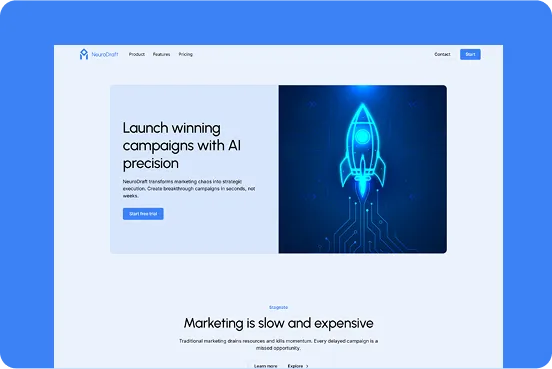
Neuro Draft

Pre-launch SaaS · From zero to converting visitors in days
Stars

“We launched Neuro Draft with zero online presence, and within days, the site started converting visitors into leads. The structure and design clearly communicate our value - it made us look established from day one.”

- Sofia Müller, Co-Founder at Neuro Draft
Neuro Draft

Atriom

Modular home builder · 67% more quote requests, month one
Stars

"Since launching the new website, the number of quote requests went up by 67% in the first month. The new design feels trustworthy, modern, and perfectly communicates the quality of our homes. Clients often mention how easy it is now to understand what we offer and contact us."

-Erik Lindström, Marketing Director at Atrium Modular Homes
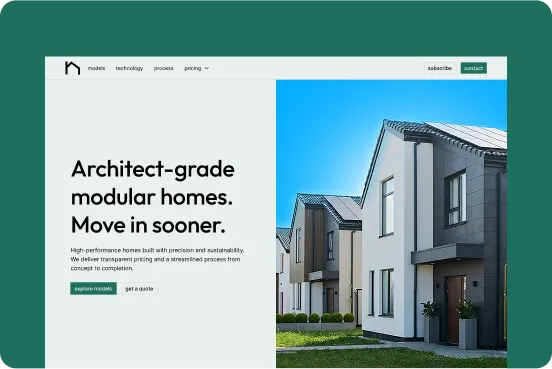
Atrium

Skyline 55

Rooftop restaurant · 40% more reservations in 30 days
Stars

“The new website instantly elevated our online presence. We received over 40% more table reservations in the first month, and guests often mention how stunning and easy to use the site is. It truly reflects the atmosphere of our rooftop restaurant.”

- Elena Fischer, General Manager at Skyline 55
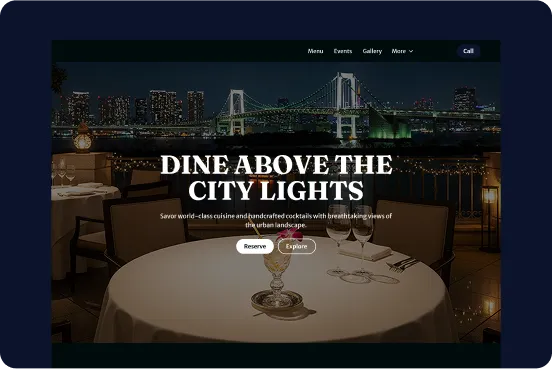
Skyline 55
The Stack

The tools doing the work, and why each one earns its place

No mystery stack. No "trust me, it's complicated." Here's exactly what I use, and what each tool does for your project.
logo

Discovery

Most websites fail because nobody asked the right questions before opening Figma. We figure out what you actually sell, who actually buys it, and what they need to see before they trust you. Then, and only then, does anyone draw a single rectangle.
logo

Relume

I use Relume AI to quickly generate a wireframe and a basic style guide. This helps us visualize the layout and direction right from the start, saving time and keeping everything aligned with your brand.
logo

Figma

In Figma, I design every section carefully to match your goals and brand identity. The result is a clean, modern design that’s both functional and visually consistent.
Icon

Webflow

Webflow is what Apple, Dell, and Upwork use for their landing pages. Not a coincidence. It produces clean code, loads in under two seconds on a mobile connection, and lets you edit anything yourself by clicking on it. No plugins. No "the developer needs to look at it." Just a fast, professional site that works on every device and ranks where Google can find it.
Benefits

Faster to launch. Built to convert. Yours to edit.

Four things you get, and the reason each one matters.

AI-accelerated workflow

Brief on Monday, building by Tuesday. AI handles the repetitive parts so I can spend time on the things that actually move conversions.
Process

Conversion-first structure

Every section earns its place. Every CTA points to one action. No mystery scroll, no buried "contact" link in the footer.
Visual

Webflow best practices

Clean class names, lean code, organized CMS. When you need to add a section in six months, it takes an hour, not a rebuild.
Visual

Integrations

Stripe, Calendly, your CRM, GA4, connected and tested before launch. You start collecting data the day the site goes live, not three weeks later.
Visual

Questions I get on almost every Upwork call

Get answers to common questions about my process.
Is this a custom build, or a template?
arrow

Every site is custom, not a template, not a WordPress theme, not a Wix drag-and-drop. The structure is designed in Relume and Figma based on what your business actually does, then built in Webflow. Most templates are recycled designs sold to thousands of other businesses. Your version of yours is yours alone.

How is this different from WordPress, Wix, or Squarespace?
arrow

WordPress runs on plugins. Wix runs on bloat. Webflow gives you clean HTML, CSS, and JavaScript. Which means three things you'll actually feel: pages load faster (Google ranks faster sites higher), there's nothing to "update" every month (no plugin breaks), and you don't pay a developer every time you need to change a headline.

What does "quality" actually mean in practice?
arrow

A pixel-perfect, fully responsive site that works on every device. Before delivery, I QA every link, animation, and breakpoint on desktop, tablet, and mobile. You also get a Loom walkthrough showing how everything works, so you know exactly what you're approving.

Can I edit the site myself after launch?
arrow

Yes, without touching code. You get full Webflow Editor access and a video handoff that walks through changing text, swapping images, adding blog posts, and updating sections.

How do payments work?
arrow

All payments go through Upwork's escrow system. You only release funds when you've seen the work and you're happy with it. No direct invoices, no chasing. If something's wrong, Upwork sits between us and protects you.

Your new site, live in days, not next quarter

Custom Webflow build. AI-accelerated workflow. Real handoff. Backed by Upwork's escrow.
Message me on Upwork